Spreadsheet Planner
The retirement model, as a spreadsheet you own.
For singles and couples (including partners of different ages), homeowners and non-homeowners. Every formula is visible, and conditional formatting flags entries that break super rules or thresholds.
Open the planner in Google Sheets
Make your own copy first: in Google Sheets choose File, Download, Microsoft Excel. Don't edit the shared version.
How to use it
- Only the THE PLAN tab needs input. The other tabs do the calculations; editing them can break the formulas.
- Step 1, today: fill in the blue cells: who you are, ages, desired income, assets, income and loans.
- Step 2, assumptions: growth rates, inflation and indexing. The defaults are sensible; change them to stress-test.
- Steps 3 and 4, the future: a year-by-year grid for you/partner. Deposits positive, withdrawals negative: downsizing, selling a property, contributions, loan changes.
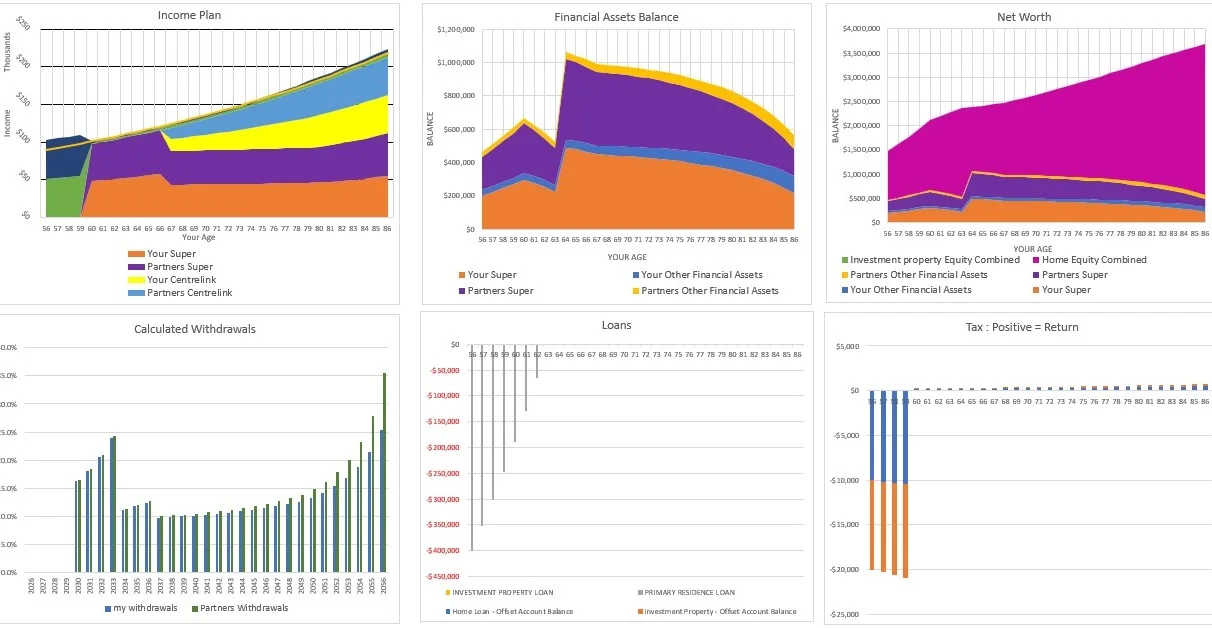
- Results: the charts on THE PLAN tab update as you type.
Full instructions
Step 1: your current situation
Fill in the blue input cells on THE PLAN tab: marital status and home ownership (drop-downs), ages and retirement ages for you/partner, desired yearly retirement income, assets (super, shares, cash, cars and contents, investment property, home value), income (salary, rent, other income, deductions) and loans (home and investment balances and repayments).
Step 2: assumptions
Growth rates for salary, super, shares and dividends, cash, loan interest, inflation, and Centrelink and tax indexing. The defaults are sensible; change them only to stress-test, for example lower super returns.
Steps 3 and 4: future planning
A year-by-year grid for one-off or ongoing changes: Step 3 for you, Step 4 for a partner. Deposits are positive and withdrawals negative. Model downsizing, selling an investment property, changing loans or making non-concessional contributions. Leave the rows blank and the model projects from your Step 1 balances and Step 2 growth, drawing your desired income each year.
Worked example: downsizing
The template includes a 2033 example: the home loan reaches $0, the home sale shows −$300,000, and the downsizer row shows +$300,000 into super. A downsizer contribution doesn't need the loan cleared first.
Results
The charts on THE PLAN tab update as you type: income sources, financial asset balances, net worth, withdrawals by asset, combined cash flow, loan balances and a tax summary.
The other tabs
Your Calculations, Your Partner's Calculations, Centrelink Calculations, Graph Calculations and Caps and Thresholds do the work. Only change Caps and Thresholds, when new rates are released.
Practical tips
- Enter everything in today's dollars; the model applies inflation and indexing.
- Rates and thresholds are as at 1 July 2026. Update the Caps and Thresholds tab when new figures are released.
- The parameters match the web planner, so the video series explains both.
Prefer it done for you?
The web planner runs the same kind of model with nothing to install, plus a PDF report. A free account (just your email) adds saving your plan as a file on your own device.
Open the web planner