Most retirement calculators force you to simplify: one flat return, one average tax rate, a pension guess. Real retirement doesn't work like that. Your super, your Age Pension, and your tax all interact, and they interact differently every year as your balances change, your drawdowns change, and the means tests bite or ease off.
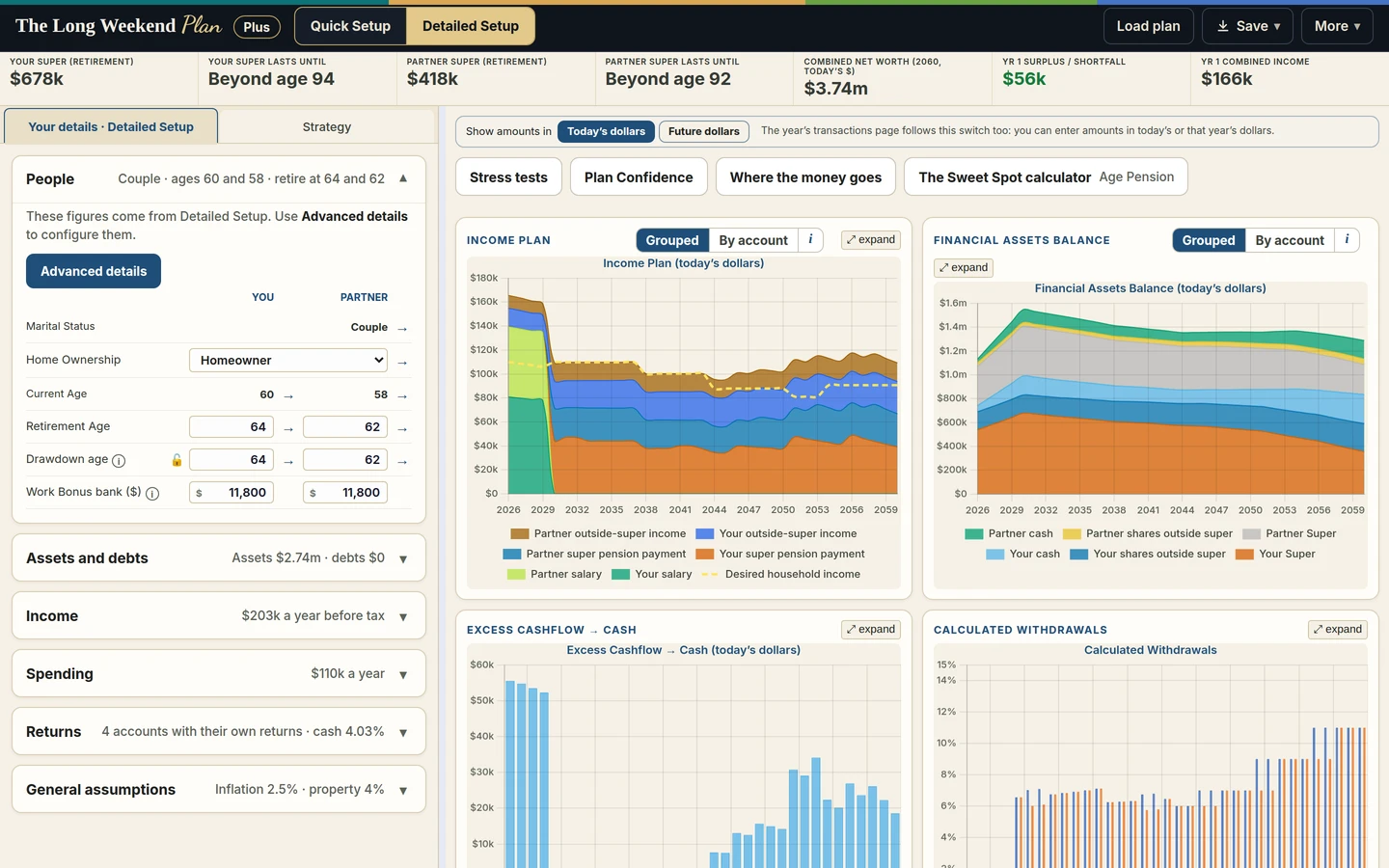
This is where PlanLens comes in. Enter your details and it models how Australia's superannuation, Age Pension, and tax rules interact across your whole retirement, year by year, giving you a sophisticated, personalised retirement plan in minutes. At the top of your plan, the answers you actually want: your projected income, your net worth, your surplus or shortfall against the lifestyle you want, and the age each partner's super will last until.
It models your real finances, not a simplified version of them:
Your drawdowns are worked out for you: tell PlanLens the income you want to live on, and each year it calculates exactly how much to draw from super to deliver it, after counting your pension, investment income, and tax, never below the government minimum for your age, and rising with inflation. You don't guess a drawdown rate; the plan tells you what living your life actually requires
Both of you, separately: your own salaries, retirement ages, super balances and growth, desired incomes, and tax positions, combined where the rules combine them and kept apart where they don't
Everything you own: super, cash, shares (with dividends and franking credits), investment property (with rental income), and your home
Your debts too: home and investment loans, interest rates, repayments, and offset accounts, modelled year by year alongside everything else
The key rules built in: superannuation drawdown minimums, Centrelink asset and income tests with indexation, ATO tax offsets including SAPTO and franking refunds, and warnings when you'd breach contribution caps or the Transfer Balance Cap
Then test your decisions. The Planning tab lets you schedule the moves you're actually weighing up, in any year of the plan: make downsizer or non-concessional contributions, pay off a loan, sell the investment property, move money between cash and shares, and watch the whole plan (pension, tax, and all) recalculate around each decision. This is where PlanLens earns its keep: not just showing your future, but showing which choices change it most.
Every year of the projection is charted: your income and your partner's, combined income and assets, tax paid, and loan balances, so you can see not just the destination but the shape of the journey. Your plan saves to a file on your computer and loads back any time.
Using it is simple: click Initialise to clear the demonstration figures, work through the Situation tab with your own details, and the plan rebuilds live as you type.
Completely private. All calculations run in your browser: nothing you enter is stored or transmitted, and nobody can ever see your figures.
No signup. No advisor. Just answers. It won't cover every edge case, but it will give the vast majority of Australians a clear, realistic picture of how long their savings will last. Part of The Long Weekend Plan toolkit alongside PensionLens and SpendLens.
© 2026 Mark Murphy. All rights reserved. PensionLens, PlanLens, and SpendLens are part of The Long Weekend Plan.
Last updated: 15 August 2026
1.1. The Long Weekend Plan, including the PlanLens, SpendLens and PensionLens tools (the "Service"), is created and operated by Mark Murphy ("we", "us", "our"), an individual based in Queensland, Australia, as a companion to The Long Weekend: Putting the Retirement Puzzle Together and A Practical Guide to Australian Superannuation.
1.2. In these Terms:
(a) "Content" means all information, data, inputs, figures, and results generated, provided, or displayed on or through the Service, including any information you enter into the calculators.
(b) "Service" refers to the website at thelongweekendplan.com and any tools, calculators, spreadsheets, or downloadable resources made available on it, including PlanLens, SpendLens, and PensionLens.
(c) "you" and "your" means the individual using the Service.
1.3. By using the Service, you agree to these Terms. If you do not agree, you must not use the Service.
1.4. These Terms set out how your information is handled at clause 5. We do not currently maintain a separate Privacy Policy document because, as explained below, we do not collect the data you enter into the tools.
2.1. The Service provides free, general-purpose retirement planning tools and calculators designed to help you model and understand aspects of the Australian retirement system, including superannuation, tax, investment income, Centrelink, and the Age Pension.
2.2. The Service is intended for general educational and self-directed planning purposes only, for use by individuals considering their own personal circumstances in Australia. It is not personal financial advice.
2.3. All calculations, projections, scenarios, and figures produced by the Service are estimates only, generated from the information you enter and a series of general assumptions and simplifications about superannuation, taxation, and Centrelink rules. They:
(a) do not constitute financial, tax, legal, or any other form of professional advice;
(b) do not take into account your complete personal circumstances, objectives, or needs;
(c) cannot and do not guarantee any future outcome; and
(d) may differ materially from your actual outcomes due to changes in legislation, markets, your circumstances, or limitations in the underlying model.
2.4. We do not hold an Australian Financial Services Licence (AFSL) and do not provide financial product advice, tax advice, legal advice, or any other licensed or regulated advisory service.
2.5. Before making any decision about your super, investments, retirement, Centrelink entitlements, or estate planning, you should seek advice from an appropriately licensed and qualified professional (such as a financial adviser, tax agent, or Centrelink financial information service officer) who can consider your full circumstances.
3.1. The Service provides calculators, projection tools, spreadsheets, and reference information (including rates, thresholds, and rules relating to superannuation, tax, and Centrelink).
3.2. Except where otherwise stated, everything provided through the Service:
(a) is for general informational and educational purposes only;
(b) has not been independently audited or verified;
(c) may contain errors, omissions, or inaccuracies, whether in the underlying logic, the legislative data used, or the results produced;
(d) should not be relied on as the sole basis for any financial decision;
(e) is based on general assumptions, simplifications, and rules that may not reflect your personal situation, fund type, or any grandfathered provisions that apply to you;
(f) reflects legislation, rates, and thresholds believed current as at the date shown on the Service, which may change without notice and without update to the Service;
(g) is provided "as is" and "as available", without warranties of any kind, express or implied; and
(h) should be independently verified — including against the relevant government agency (such as the ATO, Services Australia, or your super fund) — before you rely on it.
3.3. You are solely responsible for the accuracy of any information or figures you enter into the tools. The accuracy of any output depends entirely on the accuracy and completeness of what you input.
3.4. Where the Service processes data you upload (such as bank statement data used by SpendLens) entirely within your browser, we have no visibility into, access to, or record of that data — see clause 5.
4.1. Nothing on the Service constitutes a recommendation, opinion, or endorsement that any particular course of action, strategy, product, or approach is suitable for you.
4.2. Any references on the Service to strategies (such as downsizing, contribution strategies, or selling an asset) are illustrative scenarios you can model — not a recommendation that you take that action.
4.3. We do not promote, sell, or receive any commission, fee, or referral payment from any financial product, adviser, or platform. The Service is independent and does not endorse third-party financial products.
5.1. The Service is designed so that calculators run entirely within your own browser. Figures you enter, and any files you upload (such as bank statements), are processed locally on your device and are not transmitted to, stored by, or accessible to us.
5.2. Because we do not collect the figures or data you enter into the tools, we cannot recover, back up, or restore that information, and we have no ability to verify or correct it on your behalf.
5.3. Like most websites, the Service is hosted on a third-party platform (Google Sites) which may collect limited technical information automatically (such as your IP address, browser type, or general location) for hosting and basic analytics purposes. We do not use this information to identify you personally, and it is separate from anything you enter into the calculators.
5.4. You are responsible for the security of your own device and for backing up any results, exports, or data you choose to save locally.
5.5. If we later introduce any feature that does collect or store personal information (for example, an email sign-up), we will publish a dedicated Privacy Policy before that feature goes live, and it will form part of these Terms.
6.1. The Service is currently provided free of charge.
6.2. We may introduce fees for the Service, or particular features of it, in the future. If we do, this will be clearly disclosed before any fee applies to you, and you will not be charged without your agreement.
7.1. You must not, in connection with the Service:
(a) use the Service for any purpose other than your own personal retirement planning;
(b) attempt to access, tamper with, or interfere with any non-public part of the Service or its underlying systems;
(c) scrape, systematically extract, or reproduce Content from the Service, or use automated tools to access the Service, without our prior written consent;
(d) reverse engineer, decompile, disassemble, or attempt to derive the source code or underlying methodology of the calculators;
(e) copy, resell, sub-license, or otherwise commercially exploit the Service or any part of it without our express written permission;
(f) misrepresent results generated by the Service as advice, or hold yourself out as authorised to provide advice using the Service;
(g) use the Service in a way that breaches any applicable law; or
(h) use the Service if you are under 18 years of age.
7.2. The Service is designed around Australian legislation, tax rules, and the Age Pension system, and may not produce meaningful or accurate results if you are not an Australian tax resident or the relevant rules do not apply to you.
8.1. The Service, including its design, calculators, underlying methodology, text, and branding (The Long Weekend Plan, PlanLens, SpendLens, PensionLens), is owned by or licensed to us and is protected by copyright and other intellectual property laws.
8.2. You may use the Service and its output for your own personal, non-commercial planning purposes. You may not reproduce, republish, or commercially exploit the Service, its methodology, or its Content without our prior written permission.
8.3. If you provide us feedback, suggestions, or Content (for example, via our Feedback page), you grant us a non-exclusive, royalty-free, worldwide licence to use it to operate, maintain, and improve the Service, without any obligation to you.
9.1. To the maximum extent permitted by law:
(a) the Service, its Content, calculators, and outputs are provided "as is" and "as available," without any warranty of any kind, whether express, implied, or statutory, including as to accuracy, completeness, reliability, currency, or fitness for a particular purpose;
(b) we do not warrant that the Service will be uninterrupted, error-free, or free from inaccuracies;
(c) any reliance you place on the Service, its Content, or its output is entirely at your own risk; and
(d) we exclude all liability (including in contract, tort, negligence, or otherwise) for any loss or damage — including financial loss, loss of opportunity, or consequential loss — arising from or connected with your use of, or reliance on, the Service, its calculators, or any output it produces.
9.2. Nothing in these Terms excludes, restricts, or modifies any consumer guarantee, right, or remedy that cannot lawfully be excluded under the Australian Consumer Law. Where liability cannot be excluded but can be limited, our liability is limited (at our option) to re-supplying the Service or the cost of having it re-supplied.
9.3. We are not liable for any loss or damage arising from decisions you make based on projections, scenarios, or figures produced by the Service, or on the basis that legislation, rates, or thresholds used by the Service may become outdated.
9.4. We are not responsible for the content, accuracy, or practices of any third-party sites, tools, or resources linked from the Service (including Amazon, Facebook, or any other platform), and any dealings you have with them are solely between you and that third party.
10.1. We may modify, suspend, or discontinue the Service, or any part of it, at any time without notice.
10.2. We may update these Terms from time to time. The version published on the Service at the time you use it applies. Continued use of the Service after an update constitutes acceptance of the updated Terms.
10.3. We may restrict or block access to the Service for any user we reasonably believe is misusing it or breaching these Terms.
11.1. If any part of these Terms is found to be illegal or unenforceable, that part will be severed and the remainder will continue to apply.
11.2. These Terms represent the entire agreement between you and us regarding the Service and supersede any prior understanding.
11.3. Our failure to enforce any part of these Terms at any time is not a waiver of our right to do so later.
11.4. These Terms are governed by the laws of Queensland, Australia, and you submit to the non-exclusive jurisdiction of its courts.
Questions about these Terms can be sent via the Feedback page.
A plain-English guide to using the PlanLens retirement planning tool
● Document type: User Guide
● Version: 1.0
● Date: 31 July 2026
● Owner: PlanLens
● Status: Current
● Applies to: PlanLens web application (client-side, browser-based)
● Companion documents: PlanLens Technical Specification / PlanLens User Guide (see companion doc); SuperAnalysis spreadsheet
What PlanLens is
PlanLens is a free retirement planning tool that projects your finances year by year and shows you whether your savings will support the life you want. It brings together the three things that usually get worked out separately: your superannuation, the Age Pension, and tax. It applies the real Australian rules, using the current 2026-27 rates and thresholds.
Unlike most calculators, PlanLens works backwards from the income you want. You tell it the yearly income you would like to live on, and it works out how much you need to draw from your super each year to deliver it, after taking account of your Age Pension, your investment income, and the tax you pay.
PlanLens runs entirely in your web browser. Nothing you enter is uploaded, stored, or transmitted. Your figures stay on your own device.
Whatever you change, PlanLens keeps a row of headline figures at the top of the plan. These are the answers most people are looking for:
● Your super (retirement) and Partner super (retirement): the projected balance of each super account at the point of retirement.
● Your super lasts until and Partner super lasts until: the age each person’s super is projected to last. PlanLens works this out from the same year-by-year balances used everywhere else in the plan: it looks at every year from retirement onward and finds the last one where the balance is still ≥ $5,000 (the same threshold the withdrawal chart uses to decide when a balance is effectively exhausted). If the balance is still above that level in the final modelled year, this shows “Ongoing” rather than an age, because it did not run out within the plan.
● Combined net worth (30 year): your total projected net worth at the end of the projection horizon. This is your combined super, plus shares and cash, plus your equity in your home and any investment property (that is, the property’s value after subtracting whatever is still owed on it, not the raw property value).
● Year 1 surplus / shortfall: whether your first year’s income meets, exceeds, or falls short of the income you asked for.
● Year 1 combined income: your total household income in the first year, after tax.
PlanLens opens with a set of demonstration figures already filled in, so you can see how everything works before entering your own details.
When you are ready to enter your own situation, use the
Initialise button to clear all the demonstration inputs and start fresh. There is also a Clear tab button if you want to clear just the inputs on the tab you are currently working in, rather than everything.
Your plan rebuilds live as you type. There is no calculate button to press. Every time you change a figure, the charts and the headline results update immediately.
Your details are organised across three tabs:
● Finances: your actual situation now. Ages, income you want, super, savings, property, loans, and current income.
● Assumptions: the rates that drive the projection forward, such as inflation, investment growth, and how the rules themselves are indexed over time.
● Planning: the one-off decisions you want to test, scheduled into any year of the plan.
The rest of this guide works through each tab in turn.
This is where you enter your situation as it stands today. If you are a couple, you will see a
You column and a Partner column for most fields, so each person is entered separately.
● Marital Status: Single or Couple. Choosing Couple adds the partner column throughout and applies the couple rates and thresholds.
● Home Ownership: Homeowner or Non-Homeowner. This matters because the Age Pension assets test uses more generous limits for non-homeowners, and your home itself is not counted as an assessable asset.
● Current Age and Retirement Age: your age now, and the age you plan to retire. Super is not drawn until retirement age.
● Desired Income / yr: the yearly income, in today’s dollars, that you want to live on. This is the figure PlanLens works backwards from. It is held in today’s purchasing power and grown with inflation each year.
● Super Balance: your current super balance.
● Concessional Contrib. (%): employer and salary-sacrifice contributions as a percentage of salary, made while you are still working. These are taxed at 15% going into the fund.
The rate your super grows at is set on the Assumptions tab (see
Super Total Growth there). It is worth knowing now that the figure you enter is your expected annual return before tax. PlanLens then applies 15% tax on earnings while the account is in accumulation phase, and zero tax once it is in pension phase, so the effective growth differs between the two phases automatically.
● Shares: the value of shares held in your own name, outside super.
● Cash / Bank: cash and bank savings outside super.
These are assessed by Centrelink and are subject to deeming under the income test.
● Primary Residence: the value of the home you live in. If you are a homeowner, this is not counted in the assets test.
● Rental Property (Market Value): the market value of an investment property.
Note: an investment property is assumed to be held personally, outside super. If it is held inside an SMSF, the tax treatment differs, and the Technical Specification covers that assumption.
● Home Loan Balance and Home Loan Monthly Repayment: your mortgage on your home, and what you repay each month.
● Investment Loan Balance and Investment Loan Monthly Repayment: any loan against your investment property, and its monthly repayment.
Loans are modelled year by year, reducing as you repay them, and their interest rates are set on the Assumptions tab.
● Cars, Furniture, Valuables: personal assets, which are counted in the Age Pension assets test.
● Gross Salary: your salary before tax, while still working.
● Rental Net Income / yr: net income from an investment property, after expenses.
● Other Net Income / yr: any other income. Note this is grown by inflation each year in the projection.
● Tax Deductions / yr: annual tax deductions, entered as a negative figure, which reduce your taxable income.
If you or your partner receive a pension from overseas, set
Include an overseas pension? to Yes. This reveals three fields for each person:
● Annual amount, gross: the yearly amount in today’s dollars.
● Starts at age: the age the pension begins.
● Indexation: choose Frozen or Indexed. Frozen means it stays flat in nominal terms, which is how the UK State Pension is treated for Australian residents. Indexed means it grows with inflation, as US Social Security does.
An overseas pension is assessed under the Age Pension income test and is included in your taxable income. It is not deemed, because it is a real income stream rather than a financial asset.
Note: balances are shown as start-of-year figures, with interest and adjustments applying during the year.
This tab is one of the things that sets PlanLens apart. Most calculators give you a single growth rate. PlanLens lets you set every rate independently, and crucially, it lets you set how the rules themselves change over time. Every field has a sensible default, shown in brackets below, so you can leave them alone or adjust any of them to test a different future.
● Inflation / yr (default 3%): the annual CPI rate, used to index your desired income and other expenses over time. The Reserve Bank’s target band is 2 to 3%. This is central to the projection: your desired income and other income are held in today’s dollars and grown by this rate, so the plan always shows income in real, comparable terms.
● Super Total Growth (after dividends and franking) (default 9%): your expected annual super return before tax, as a single all-in figure that already accounts for dividends and franking within the fund. PlanLens applies 15% tax to earnings in accumulation phase and zero in pension phase, so you enter one before-tax number and the tool handles the phase difference.
● Salary Growth / yr (default 2%): how much your salary rises each year while working.
● Shares Capital Growth (excl. dividends) (default 4%): the yearly capital growth of shares held outside super, not counting dividends.
● Shares Dividend Return (default 5%): the dividend yield on those shares, paid as income.
● Franking % (default 70%): the degree of franking on your share dividends. Australian shares are typically 70 to 100% franked. This drives the franking credits applied in the tax calculation.
● Cash Interest Rate (default 3.5%): the interest earned on your cash and bank savings.
● Rent increases from investment property / yr (default 2%): how much your rental income rises each year.
● Property value increases / yr (default 4%): the yearly growth in property values, applied to both your primary residence and any investment property.
● Home Loan Rate (default 6%) and Investment Loan Rate (default 6%): the interest rates applied to your loans.
These two settings are unusual, and they are what make a long projection realistic rather than a snapshot frozen at today’s rules.
● Centrelink indexing / yr (default 2.6%): how the Age Pension rates and thresholds rise each year. Centrelink adjusts these regularly, so over a 20 or 30 year plan they move substantially. Setting this means your future pension is measured against future thresholds, not today’s.
● Tax bracket and SAPTO indexing / yr (default 1%): the rate used to index the income tax bracket boundaries and the tax offsets over time. The offsets this covers are SAPTO (the seniors and pensioners tax offset, for pension-age Australians aged 67 and over) and LITO (the low income tax offset, for low-to-middle income earners). Without this indexing, a plan would assume the tax scale never changes for decades, gradually overstating the tax you pay as your nominal income rises.
Taken together, these mean PlanLens is not just projecting your money forward. It is projecting the rules forward too, at rates you control.
This is where PlanLens goes beyond “if nothing changes.” The Planning tab lets you schedule the real decisions you are weighing up, in any year of the plan, and watch the whole projection, pension, tax and all, recalculate around each one.
At the top of the tab is a year slider, running from the start of your plan out to 30 years. Move the slider, or use the forward and back arrows, to select the year you want a decision to happen in. The ages of you and your partner in that year are shown, so you can line a decision up with, for example, the year someone reaches Age Pension age. You then enter the action in the fields below, and it is applied in the selected year.
For each person, in the chosen year, you can:
● Non-Concessional Contribution: add a non-concessional (after-tax) amount into super. PlanLens warns you if the 3-year rolling total would exceed the bring-forward cap of $390,000, or if your balance already exceeds the $2.1m Transfer Balance Cap.
● Downsizer (+) or Lump Sum Withdrawal (−): make a downsizer contribution into super (entered as a positive figure), or take a lump sum out (entered as a negative figure). A warning appears if a downsizer amount exceeds the per-person limit of $300,000, or if it is scheduled before age 55 (the minimum age for a downsizer contribution).
● Shares Deposit (+) / Withdrawal (−): move money into or out of your shareholding.
● Cash Deposit (+) / Withdrawal (−): move money into or out of cash.
● Primary Residence Renovate (+) / Sell (−): increase the value of your home through a renovation, or sell it.
● Rental Property Buy/Renovate (+) / Sell (−): buy or improve an investment property, or sell it.
● Home Loan Pay off (+) / Increase (−), and its Offset Account Balance: pay down or draw on your home loan, and set an offset balance against it.
● Investment Loan Pay off (+) / Increase (−), and its Offset Account Balance: the same for your investment loan.
Because every one of these feeds back through the whole model, you can see not just that a decision is possible, but how it changes your income, your pension, your tax, and how long your money lasts. This is where PlanLens is most useful: it shows you which choices change your outcome the most.
Alongside the headline figures at the top, PlanLens charts every year of the projection. Each chart updates instantly as you change any input, so you see not just the destination but the shape of the journey.
● Income Plan: your income each year, broken down by where it comes from (super drawdowns, Age Pension, and other income), shown against your desired income line. This is the main output: it tells you whether your target income is being met, year by year.
● Financial Assets Balance: your super and other financial assets over time, showing how they build up and then draw down through retirement.
● Calculated Withdrawals: the drawdown rate needed each year to meet your desired income, for each of you.
● Loans and Offset Accounts: your loan balances and offset accounts across the plan.
● Tax: the tax paid each year. The chart is titled “Tax: positive = return,” because a positive figure means a refund rather than a bill, which can happen when franking credits or offsets exceed the tax owed.
● Net Worth: your total net worth across the horizon, combining super, other financial assets, and property equity, net of loans.
Each chart has an expand control, so you can open any chart full screen to see it in detail, then close it again.
Below the charts, an
All Transfers overview table lists every scheduled decision from the Planning tab, laid out by year, so you can see at a glance what happens when.
● Save session writes your whole plan to a file on your own computer, so you can come back to it later.
● Load session reads a saved plan back in.
● Export to PDF produces a full report of your plan that you can keep or take to an adviser.
Because everything runs in your browser, saving to a file is how your plan persists. Nothing is stored online.
PlanLens is a modelling tool. It helps you see your own numbers, understand how super, the Age Pension and tax fit together, and test the decisions in front of you. It is built on the published Services Australia and ATO rules, using the current 2026-27 rates.
One thing to be aware of if you are still working: PlanLens does not model the Work Bonus, the concession that lets pensioners earn a certain amount of employment income before it counts towards the Age Pension income test. If you are modelling wages after Age Pension age, PlanLens will be conservative, showing a slightly lower pension than you may actually receive. For questions specifically about working in retirement and how much you can earn before your pension reduces, use the companion tool PensionLens, which does model the Work Bonus.
It is not personal financial advice. For a specific, irreversible decision, it is worth confirming with a licensed adviser. PlanLens is designed to make that conversation more informed, not to replace it.
To see how the pieces fit together, here is the kind of scenario PlanLens is built for, using figures like the demonstration couple the app opens with.
A couple, one aged 56 and the other 58, both planning to retire at 60. One has $200,000 in super, the other $150,000. Between them they hold some shares and cash outside super, own their home, and have an investment property with a loan against it. They are both still working, and they want a retirement income of $60,000 each per year in today’s dollars.
Entering this on the Finances tab, PlanLens immediately projects the whole picture. In the years before 60, their super grows with contributions. From 60, they retire and begin drawing an income. Because they are under Age Pension age until 67, they receive no pension yet, so the full $60,000 each has to come from their own super and investments, and the required drawdown rate is high.
From 67, both reach Age Pension age. Their assessable assets are now tested, and as their super draws down over the years, they gradually become eligible for a growing part pension. The Income Plan chart shows this clearly: the Age Pension band grows over time, and the amount they need to draw from super falls back toward the legislated minimum.
They can then go to the Planning tab and test decisions. For instance, scheduling a downsizer contribution in the year they sell a property, or paying off the investment loan early, and watch how each choice changes the income plan, the tax, and how long their super lasts. The headline figures at the top update instantly, so they can see at a glance whether a change leaves them better or worse off.
This is the core value of the tool: not a single answer, but the ability to see their own numbers and test the real decisions in front of them.
This guide covers what you see and enter in the app. The calculations behind every figure, including the tax order of operations, the Age Pension means tests, the drawdown formula, and every rate and threshold used, are set out in full in the companion
PlanLens Technical Specification, which is written for advisers, reviewers, and anyone who wants to check the method behind the numbers.
The same rules and rate tables also drive the companion spreadsheet,
SuperAnalysis, which exposes every formula and threshold openly and is cross-checked against PlanLens across a range of scenarios.
How PlanLens calculates its results — for advisers, reviewers, and validation purposes
▪ Version: 1.1
▪ Date: 3 August 2026
▪ Owner: PlanLens
▪ Status: Current
▪ Applies to: PlanLens web application (client-side, browser-based)
▪ Companion documents: PlanLens Technical Specification / PlanLens User Guide (see companion doc); SuperAnalysis spreadsheet
This document specifies how PlanLens calculates its results. It is intended for advisers, reviewers, and anyone who wants to understand, or independently verify, the method behind the numbers, including as a validation reference for commercial use.
Every rate and threshold described here is also laid out openly in the companion spreadsheet, SuperAnalysis, in its Caps and Thresholds sheet, and the two tools are built to produce the same results. Where this document and the spreadsheet describe the same calculation, they are describing the same underlying method; this document is the narrative reference, and the spreadsheet is the fully worked, inspectable version.
For a plain-English walkthrough of the application’s inputs, tabs, and outputs, see the companion PlanLens User Guide. This document assumes familiarity with that guide and focuses on method, not screen layout.
PlanLens models a single household, either a single person or a couple, across a projection of up to 30 years (31 modelled years including the starting year). It combines three systems that are usually calculated separately (superannuation drawdown, the Age Pension means tests, and personal income tax) and runs them together year by year so their interactions are captured.
The model is income-led. Rather than asking the user to nominate a drawdown rate, it asks for the income they want and solves for the drawdown required to deliver it, subject to the legislated minimums.
The projection is built on the published Services Australia and ATO rules for 2026-27. Rates and thresholds are indexed forward across the projection at rates the user sets, so a long plan reflects a changing system rather than today’s figures frozen in place.
PlanLens makes a number of deliberate modelling choices. Stating them explicitly:
▪ Retirement moves super to pension phase. Before retirement, super is in accumulation phase and its earnings are taxed at 15%. At retirement age, it moves to pension phase, drawdowns begin, and earnings become untaxed. Retirement is the single trigger for this switch.
▪ Super is only counted by Centrelink once a person has retired. Accumulation-phase super, belonging to someone who has not yet retired, is not included in the assets test. This captures the younger-spouse position: a younger partner’s super stays out of the means test until they retire.
▪ Drawdowns meet the target, but never fall below the legislated minimum for the person’s age, and are capped at 100% of the balance.
▪ Super drawdowns are tax-free, on the basis that the account holder is over 60 when drawing.
▪ Investment income (dividends, interest, rental income) is taxed to whichever person the underlying assets are entered against in the inputs. There is no automatic 50/50 split. A couple wanting an even tax split needs to divide the input balances themselves (e.g. half the shares balance under each person); the model has no concept of joint ownership beyond that.
▪ Dividends are treated as income at the dividend rate, with franking credits applied per the franking percentage, while share capital grows separately at the capital growth rate.
▪ The age difference between partners is handled accurately. Each person is assessed separately for Age Pension eligibility against their own age, so a couple where only one has reached Age Pension age is modelled correctly: the pension is assessed on the couple’s combined position, with eligibility and payment reflecting who actually qualifies.
▪ The Work Bonus is not modelled. PlanLens does not apply the Work Bonus or its income bank to employment income. Where someone has significant wages after Age Pension age, PlanLens will be more conservative than the actual rules (showing a lower pension), because the real Work Bonus shelters the first part of employment income from the income test. The companion tool PensionLens does model the Work Bonus, and is the better tool for questions specifically about working in retirement.
These are the figures the model uses in the base year (2026). They are also laid out in full in the SuperAnalysis spreadsheet’s Caps and Thresholds sheet, and are indexed forward each year as described in the Indexation and growth section below.
▪ $0 – $18,200: Nil
▪ $18,200 – $45,000: 15%
▪ $45,000 – $135,000: 30%
▪ $135,000 – $190,000: 37%
▪ Above $190,000: 45%
Source: ATO, published 2026-27 resident tax brackets. Bracket boundaries are scaled forward each year by the tax indexing rate; marginal rates themselves are not indexed.
▪ Single: Full offset: $2,230; Shade-out threshold: $34,919; Cut-out threshold: $52,759
▪ Couple (combined): Full offset: $3,204; Shade-out threshold: $61,988; Cut-out threshold: $87,620
Taper: 12.5 cents per dollar of taxable income over the shade-out threshold. For a couple, the full offset and thresholds shown are combined figures; the model applies half of each to each person individually. SAPTO only applies from Age Pension age (67).
▪ $700: Shade-out threshold: $37,500; Knee point: $45,000; Cut-out threshold: $66,667
Taper: 5 cents per dollar of taxable income from the shade-out threshold to the knee point; 1.5 cents per dollar from the knee point to the cut-out threshold.
▪ Full pension, per year: Single: $31,223.40; Couple (combined): $47,070.40
▪ Full-pension asset limit: homeowner: Single: $333,000; Couple (combined): $499,000
▪ Full-pension asset limit: non-homeowner: Single: $600,000; Couple (combined): $766,000
▪ Income-free area, per year: Single: $5,876; Couple (combined): $10,296
▪ Deeming threshold: Single: $66,800; Couple (combined): $110,600
Asset test taper: pension reduces $3 per fortnight for every $1,000 of assessable assets over the full-pension threshold, applied on an annual basis (i.e. $78/year per $1,000 over). Income test taper: pension reduces 50 cents per dollar of assessable income over the income-free area (for a couple, this is 25 cents each, since the combined taper is applied to the combined income-free area). Deeming rates: 1.25% on financial assets up to the deeming threshold, 3.25% on the balance above it. Age Pension age is 67.
▪ SAPTO-eligible (67+): Lower threshold: $44,268; Upper threshold: $55,335
▪ All other taxpayers: Lower threshold: $28,011; Upper threshold: $35,013
The standard Medicare levy rate is 2%. Below the lower threshold, no levy is payable. Between the lower and upper thresholds, the levy phases in at a shading rate; above the upper threshold, the full 2% applies to total taxable income. All rates and thresholds used are the 2026-27 figures.
▪ Non-concessional bring-forward cap (3-year rolling): $390,000
▪ Transfer Balance Cap: $2.1m
▪ Downsizer contribution, per person: $300,000
These are guardrails PlanLens uses to warn the user of a scheduled action that would breach a cap, using the 2026-27 figures. A downsizer contribution also requires the contributing person to be at least 55 years old; PlanLens warns if a downsizer entry is scheduled before that age.
PlanLens builds a row of results for each year of the projection (31 rows, covering the starting year and the following 30). Each year’s row carries the ages of both people, their balances, an inflation index, a Centrelink indexing factor, and a tax indexing factor, each compounded forward from the start year at the rates set on the Assumptions tab. All subsequent calculations for that year read from its row, so every figure is internally consistent for the year it belongs to.
Balances are treated as start-of-year values, with growth, interest, contributions, withdrawals and loan repayments applied through the year.
Each year’s row is built up in a fixed sequence, since later steps depend on the results of earlier ones:
▪ Ages and indexing factors (inflation, Centrelink, tax) for the year.
▪ Salary for each person, growing at their salary growth rate until their retirement age, then zero.
▪ Concessional contributions into super: the Superannuation Guarantee-style contribution (salary × contribution percentage, defaulting to 12% and user-editable) is dollar-capped at that year's concessional contributions cap. Any extra catch-up amount entered on the Planning tab is added on top, and the combined total is then clamped to that year's cap plus any available carry-forward, using the person's super balance at the start of the year to test carry-forward eligibility (see Concessional contributions, carry-forward, and Division 293 tax below). What survives the clamp is reduced by the 15% contributions tax before landing in super.
▪ Shares and cash balances, growing at their respective rates and adjusted for any scheduled deposits or withdrawals.
▪ Property values (primary residence and investment property), growing at the property growth rate and adjusted for any scheduled sale, purchase, or renovation.
▪ Personal assets, grown by inflation.
▪ Loan balances, stepped forward year by year (see Loans, offset accounts, and property below).
▪ Non-super income: rental income, other income, and any overseas pension.
▪ Share dividends and franking credits, and cash interest.
▪ The super drawdown for the year: this step also computes the Age Pension for the year, because the drawdown calculation needs to know assessable income, and the Age Pension calculation needs to know the super balance. See Income and drawdown logic below.
▪ Final tax, total income, and the combined figures used in the charts and headline results.
The central calculation is the drawdown needed to meet the desired income. For each person in each year:
▪ The desired income for the year is taken (the user’s figure, grown by inflation).
▪ The person’s other after-tax income is subtracted. This is their non-super income (salary, rental, other income, overseas pension, dividends, franking credits, cash interest, and their share of the Age Pension) less the tax on it.
▪ What remains is the shortfall that super must cover.
▪ The withdrawal rate is set to the greater of the legislated minimum for the person’s age, and the rate needed to cover the shortfall from the current balance. It is capped at 100% of the balance.
In formula terms, the withdrawal rate is the maximum of the age-based minimum and (shortfall divided by balance), never more than 1. Where a person has not yet reached their super balance’s legislated minimum age or has a zero balance, no withdrawal is calculated.
▪ Under 65: 4%
▪ 65 to 74: 5%
▪ 75 to 79: 6%
▪ 80 to 84: 7%
▪ 85 to 89: 9%
▪ 90 to 94: 11%
▪ 95 and over: 14%
A consequence worth noting: when the Age Pension is low or absent, the whole desired income must come from super, so the required withdrawal rate can sit well above the legislated minimum. As the Age Pension phases in later in retirement, it covers a growing share of the desired income, the shortfall falls, and the required withdrawal rate drops back toward the minimum. Rising total income late in a plan is then driven by the legislated minimum rate rising with age, not by drawing more to meet the target.
When a couple is modelled, one partner may be unable to meet their share of the desired income from their own super and income, while the other has super to spare. PlanLens handles this with a top-up: if one partner falls short, the other, provided they can access their super (at or past their retirement age) and have a positive balance, draws an additional amount from their remaining balance to cover the shortfall, capped at what is left after their own withdrawal.
The shortfall for each person is measured before any top-up is applied, which prevents the two mirror-image calculations from chasing each other. The effect is that a couple’s combined super is used to meet their combined desired income, rather than one partner falling short while the other’s balance sits untouched.
Each year, PlanLens calculates the Age Pension under both means tests and applies the one that produces the lower payment, which is how Centrelink assesses it. A person is only eligible from Age Pension age (67). If neither member of a couple has reached that age, no pension is payable. If only one has, the couple is assessed on their combined position but paid at the appropriate rate (the calculated pension is split equally between the two, and paid only to whichever person(s) are eligible).
All rates and thresholds used are the 2026-27 figures, scaled forward each year by the Centrelink indexing rate.
Assessable assets are the sum of:
▪ Super that has reached the point of being counted. A person’s super becomes assessable once they reach their retirement age and it moves into pension phase. Super still in accumulation, belonging to someone who has not yet retired, is not counted. This is the basis of the younger-spouse effect: a younger partner’s accumulation super stays out of the assets test until they retire.
▪ Financial assets: shares, cash, and offset account balances (home loan and investment loan offsets).
▪ Personal assets: cars, furniture, valuables.
▪ Investment property equity: the market value of a rental property less its loan balance, floored at zero.
The home is not included for homeowners.
Above the full-pension asset threshold (which depends on single or couple, and homeowner or non-homeowner status), the pension reduces by $3 per fortnight for every $1,000 of assets over the threshold. The model applies this on an annual basis, using the whole-thousand-dollar amount by which assessable assets exceed the threshold.
Financial assets are not assessed on their actual return. Instead they are deemed: the first tranche (up to the deeming threshold) is deemed to earn the lower rate, and the balance the higher rate. The deemed income is added to the person’s other assessable income. Deeming is applied to financial assets (shares, cash, offset balances) combined with any super already in pension phase.
Assessable income for the income test is the deemed income plus non-financial income, which is salary, rental income, other income, and any overseas pension. Note that dividends and interest are not added directly, because the financial assets that produce them are already deemed. The overseas pension is counted once, assessed here under the ordinary income test rather than deemed.
Above the income-free area, the pension reduces by 50 cents per dollar of assessable income (for a couple, this is 25 cents each, i.e. 50 cents applied to their combined position and split).
The pension paid is the lower of the assets-test result and the income-test result.
PlanLens applies personal income tax in the same order the ATO uses. For each person:
▪ Taxable income is assembled: super drawdowns after age 60 are tax-free and excluded; assessable income includes salary, rental, other income, the overseas pension, investment income (dividends, franking credits, cash interest), and the assessable portion of the Age Pension, less deductions.
▪ Tax is calculated on taxable income using the marginal brackets, which are scaled by the tax indexing factor.
▪ The non-refundable offsets are applied: the seniors and pensioners tax offset (SAPTO, from Age Pension age) and the low income tax offset (LITO). Both offsets, including their amounts and their income thresholds, are scaled by the tax indexing factor, the same way the brackets are. They reduce the tax, but cannot take it below zero. Any excess non-refundable offset is not carried forward or refunded.
▪ The Medicare levy is added. It is calculated separately, using its own income thresholds (which shade the levy in gradually rather than applying it from the first dollar), and is not reduced by the non-refundable offsets.
▪ Franking credits are applied last, as a refundable offset. Because they are refundable, they can reduce the final figure below zero, producing a refund. This is why the tax chart is labelled “positive = return.”
▪ Division 293 tax, where it applies, is added last of all: 15% of the lesser of gross concessional contributions or the amount by which taxable income plus gross concessional contributions exceeds $250,000. It is not reduced by SAPTO, LITO, the Medicare levy, or franking credits, and it does not feed back into any of them. See Concessional contributions, carry-forward, and Division 293 tax for the full mechanics.
This ordering matters. Applying franking credits or the offsets in a different order would produce a different result. It is the same sequence set out by the ATO, and it matches the companion spreadsheet.
A super account grows at the rate set on the Assumptions tab, but the effective rate depends on phase. Before retirement, the account is in accumulation phase, earnings are taxed inside the fund, and growth is applied at 0.85 of the set rate (equivalent to the full rate less 15% tax on earnings). At retirement, the account moves to pension phase, drawdowns begin, earnings are untaxed, and the full growth rate applies. In other words, retiring is what moves your super from accumulation to pension phase in the model, which changes both how it grows and when Centrelink counts it.
Concessional and non-concessional contributions, and any downsizer contribution, are added to the balance in the year they occur, on top of the growth calculated for that year.
Contributions scheduled on the Planning tab are checked against the current caps, and a warning is shown if a limit would be breached:
▪ A non-concessional contribution where the 3-year rolling total (the year entered plus the following two years) exceeds the bring-forward cap of $390,000 triggers a warning.
▪ A non-concessional contribution made while the super balance already exceeds the $2.1m Transfer Balance Cap is flagged, with a note that it is not permitted.
▪ A downsizer contribution above the per-person limit of $300,000 triggers a warning.
▪ A downsizer contribution scheduled before age 55 triggers a warning, since a downsizer contribution requires the contributing person to be at least 55.
▪ A concessional contribution (Superannuation Guarantee-style plus any catch-up) that would exceed the year's cap plus available carry-forward is clamped to that limit before it reaches the balance, and a warning is shown naming the year, the amount over, and, where relevant, that carry-forward was unavailable because total super exceeded $500,000 at the prior year-end.
These are guardrails to alert the user, using the 2026-27 figures.
This section covers two additions to the concessional contributions model: the carry-forward (catch-up) mechanism, and Division 293 tax.
▪ Concessional contributions cap (2026-27): $32,500, indexed forward each year by the tax indexing rate
▪ Carry-forward eligibility threshold (total super balance): $500,000, tested per person against the balance at the end of the prior financial year
▪ Carry-forward window: 5 years
▪ Division 293 threshold: $250,000 (combined taxable income and gross concessional contributions; not indexed, frozen since 2017)
▪ Division 293 rate: 15%, on top of the standard 15% contributions tax
Carry-forward mechanics
▪ Each person carries a five-year rolling ledger of unused concessional cap, seeded from amounts the user enters on the Planning tab for the five prior financial years (2021-22 through 2025-26). PlanLens does not derive these from actual historical contributions; they are entered as a starting position.
▪ Each year, the Superannuation Guarantee-style contribution and any catch-up amount together draw first against that year’s own cap, then, if more room is needed and the person’s total super balance was under $500,000 at the prior year-end, against the oldest available carry-forward vintage first.
▪ Unused cap from a given year rolls into the ledger as a new carry-forward vintage, and expires if not used within five years.
▪ If total super was at or above $500,000 at the prior year-end, no carry-forward is available for that year regardless of what remains unused in the ledger; only that year’s own cap applies.
▪ The combined contribution for the year (Superannuation Guarantee-style plus catch-up) is capped at that year’s cap plus whatever carry-forward is available; any amount requested above that is clamped, not added to the balance, and triggers the warning described in Contributions and caps above.
Division 293 tax
▪ Calculated per person, per year, as 15% of the lesser of: the person’s gross concessional contributions for the year (before the 15% contributions tax), or the amount by which their taxable income plus gross concessional contributions exceeds $250,000.
▪ It applies to all concessional contributions for the year, including any catch-up amount, so the tax can exceed the amount payable on the standard cap alone when catch-up is used.
▪ It is calculated after, and added to, the rest of that person’s income tax (brackets, SAPTO, LITO, Medicare levy, and franking credits). It is a standalone addition: it is not reduced by any of the non-refundable or refundable offsets, and it does not feed back into their calculation.
▪ The $250,000 threshold is not indexed in the model, consistent with it having been frozen at that figure since its introduction in 2017.
An overseas pension, where entered, is:
▪ Assessed under the Age Pension income test (counted once, not deemed, because it is an income stream rather than a financial asset).
▪ Included in taxable income.
▪ Begun at the nominated start age.
▪ Either frozen (held flat in nominal terms) or indexed (grown with inflation), per the user’s choice for each person.
This matches how the companion spreadsheet handles it, and reflects the treatment of pensions such as the UK State Pension (frozen for Australian residents) and US Social Security (indexed).
This treatment is not exhaustive. PlanLens applies the amount entered in full, with no deduction of any kind. It does not model the ATO's deductible amount for foreign pensions (e.g. the undeducted purchase price treatment that can apply to some UK pensions, sometimes quoted at around 8.5%), any other scheme-specific tax-free component, or foreign tax already withheld or creditable under a double tax agreement. Where such a deduction or credit would otherwise apply, PlanLens will overstate the pension's assessable and taxable value.
Home and investment loans are modelled year by year. Each loan reduces as scheduled repayments are applied, using the interest rate set on the Assumptions tab. Interest is charged on the loan balance net of any offset account balance held against it, so a larger offset reduces the interest charged (and therefore slows or reverses the balance’s decline less than the repayment amount alone would suggest). Offset account balances, and any lump-sum payoff, can be set for any year on the Planning tab; a payoff reduces the balance directly, on top of the normal repayment and interest calculation for that year.
Property values grow at the property value increase rate, applied to both the primary residence and any investment property. Investment property equity (market value less loan balance, floored at zero) is included in the assets test; the primary residence is excluded for homeowners. A sale (entered as a negative value on the Planning tab) reduces the relevant property’s value; once a property’s tracked value reaches zero it is treated as sold and does not resume growing.
The headline figures shown at the top of the app are derived from the full year-by-year projection, not calculated independently. This section specifies exactly how each one is derived, since it is not otherwise visible in the app.
▪ Your super (retirement) / Partner super (retirement): The projected super balance in the row corresponding to that person’s retirement age.
▪ Your super lasts until / Partner super lasts until: The last modelled year, from retirement age onward, in which that person’s super balance is at least $5,000 (the same threshold used to suppress bars on the withdrawal chart once a balance is effectively exhausted). If the balance is still ≥ $5,000 in the final modelled year, the result is shown as "Ongoing" rather than an age.
▪ Combined net worth (30 year): Taken from the final modelled year: combined super balance, plus combined shares and cash, plus home equity (residence value less home loan balance), plus investment property equity (rental property value less investment loan balance). Raw property values are not used directly. Loan balances are netted off first.
▪ Year 1 surplus / shortfall: Combined total income in the first modelled year, less combined desired income in the first modelled year.
▪ Year 1 combined income: Combined total after-tax income (both people, all sources) in the first modelled year.
Different quantities are grown by different rates across the projection. This section states precisely which rate applies to which field, since this is not visible in the app itself.
▪ Desired income (so the target is held in constant purchasing power)
▪ Other net income
▪ Tax deductions
▪ Personal assets (cars, furniture, valuables)
▪ An indexed overseas pension
▪ Shares: compounded each year by the shares capital growth rate, with dividends returned separately as income at the dividend rate.
▪ Cash: compounded by the cash interest rate.
▪ Rental income: grown by the rent-increase rate.
▪ Salary: grown by the salary growth rate, while working.
▪ Property values: grown by the property value increase rate.
▪ Super balances: grown by the super growth rate, at 0.85 of that rate in accumulation phase and the full rate in pension phase.
▪ Age Pension rates and thresholds are scaled each year by the Centrelink indexing rate.
▪ Income tax brackets, the Medicare levy thresholds, the seniors and pensioners tax offset (SAPTO), and the low income tax offset (LITO), including all their amounts and thresholds, are scaled by the tax indexing rate.
The distinction matters. A field grown by inflation keeps its real value constant. A field grown by a specific return rate reflects an assumed investment performance. And the rule-indexing factors move the thresholds and brackets forward so the plan measures each future year against that year’s rules, not today’s.
Note in particular that other income is grown by inflation. If a user enters a fixed other-income figure, it is not held flat in nominal terms across the plan; it rises with inflation, preserving its real value. The Medicare levy is calculated on that year's actual (nominal) taxable income, with its phase-in threshold scaled by the tax indexing rate the same way the brackets, SAPTO, and LITO are, so the levy stays in step with the rest of the tax calculation across the projection.
PlanLens is a model, and like any model it makes simplifying assumptions. Stated honestly:
▪ It models one household. It does not model trusts, companies, or self-managed super fund-specific tax treatment. An investment property is assumed to be held personally.
▪ PlanLens has no concept of jointly-owned assets. Investment income is taxed entirely to whichever person's input column it was entered under; achieving an even split between partners is the user's responsibility via the inputs, not something the model calculates or verifies.
▪ The carry-forward ledger is only as accurate as the unused-cap amounts entered for the five prior financial years; PlanLens does not calculate these from a person's actual contribution history, so an incorrect starting position will carry through the whole carry-forward calculation.
▪ Division 293 tax is calculated year by year from that year's modelled figures. It does not model amended or deferred Division 293 assessments, or the ATO's option to release money from super to pay a Division 293 debt; PlanLens simply adds the calculated liability to that year's tax.
▪ It does not separately model franking on every income stream in all contexts; where franking is not modelled, the tax-free capacity of franked dividends is understated, which is conservative.
▪ Overseas pension treatment is not exhaustive: no deduction (e.g. the ATO's deductible amount for foreign pensions) or foreign tax credit is applied, so the entered amount is taken at full value. See Overseas pension treatment above.
▪ It does not model defined benefit pension schemes, which have scheme-specific rules (deductible amounts, reversion, indexation) that vary too widely to generalise.
▪ It does not model the Work Bonus. For someone earning wages after Age Pension age, this makes the pension estimate conservative. PensionLens should be used for questions about working in retirement.
▪ The Transfer Balance Cap ($2.1m) is used only to warn against further non-concessional contributions once a balance exceeds it. It is not enforced structurally: the model does not cap how much of a balance moves into pension phase, does not model excess transfer balance tax, and will keep treating a balance above the cap as fully tax-free in pension phase.
▪ It uses the published 2026-27 rates and thresholds. Future years are projected by indexing these forward at user-set rates; actual future rates will differ.
▪ It is a planning and modelling tool, not personal financial advice.
PlanLens and the companion spreadsheet, SuperAnalysis, are built on the same rules and rate tables. The two are cross-checked against each other across a range of scenarios, and are designed to produce the same results. The spreadsheet exposes every formula and every threshold in full, so the calculations described here can be inspected directly. The SuperAnalysis workbook used as the reference for this specification contains the following sheets: THE PLAN, Your Calculations, Your Partner’s Calculations, Centrelink Calculations, Graph Calculations, and Caps and Thresholds.
PlanLens was built alongside The Long Weekend, a 165 page plain-English guide to retiring in Australia. The book explains the superannuation rules, Age Pension means testing, and tax strategies that drive the calculations you see in this tool — so you can move from simply seeing results to truly understanding what they mean for your retirement.
If you have ever wondered why your income curve looks the way it does, or what strategies are available at your specific point on the curve, the book provides the complete picture.
Super laws, tax rules, and Centrelink assessments are complex, frequently changing, and include many exceptions. The information provided is general in nature, current as of 2026, and is not financial, legal, or tax advice. Individual circumstances, fund types, and grandfathered provisions may affect these rules, and rates and thresholds can change without notice. You should consult a licensed financial adviser, tax agent, or qualified professional before making decisions about your super, retirement, or estate planning.